Why We Built an Air-Gapped Zero-Telemetry Markdown Workbench
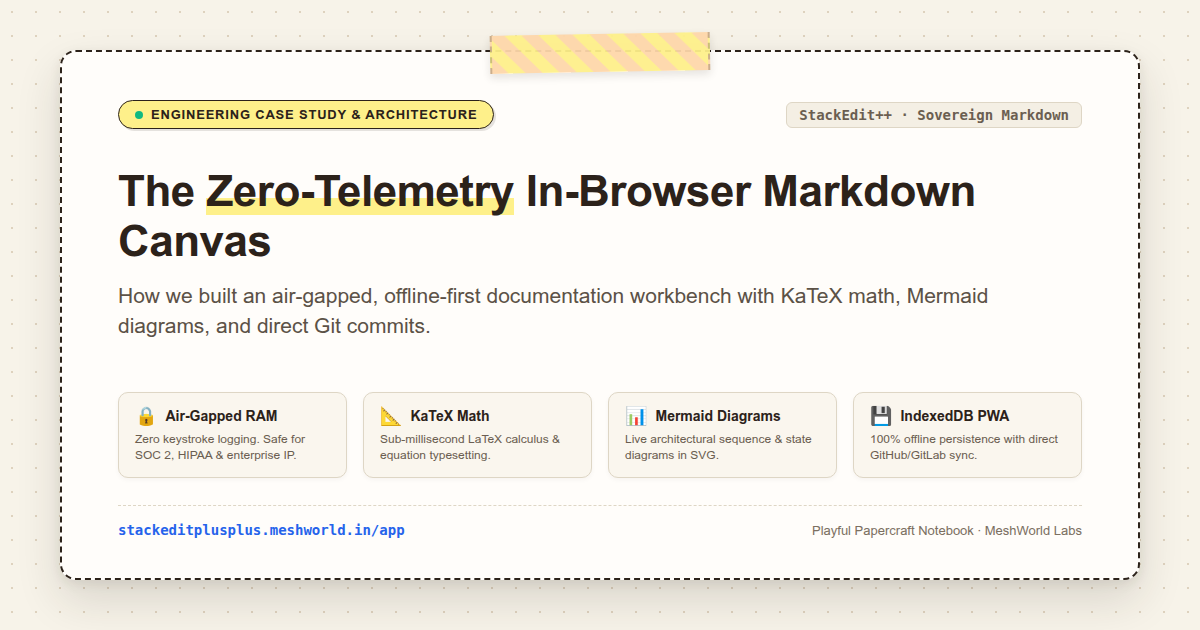
Originally published on StackEdit++.
As software engineers, systems architects, and technical writers, documentation is our highest-leverage artifact. Whether authoring an RFC, designing an Event-Driven architecture, drafting AI agent system prompts, or writing university lecture notes, the medium matters.
🌐 Launch the Live App: stackeditplusplus.meshworld.in/app
📖 Explore Use Cases & Guides: stackeditplusplus.meshworld.in
Yet today, most developers face an uncomfortable compromise between two extremes:
Heavyweight Desktop IDEs: Launching VS Code or IntelliJ with a dozen markdown, LaTeX, and diagram extensions just to sketch an idea or format a scratchpad document.
Cloud-Synced SaaS Notepads: Browser-based tools (Notion, HackMD, Google Docs) that force account creation, stream every keystroke over WebSocket channels to remote servers, and store proprietary design docs on third-party cloud infrastructure.
If you work in an enterprise operating under SOC 2 Type II, HIPAA, GDPR, or strict confidentiality agreements, pasting customer schemas, cryptographic tokens, or proprietary source code into a third-party cloud markdown app is a security violation.
That is why we built and maintain StackEdit++—a sovereign, zero-telemetry in-browser Markdown canvas engineered for engineers who need instant execution, mathematical rigor, and complete data privacy.
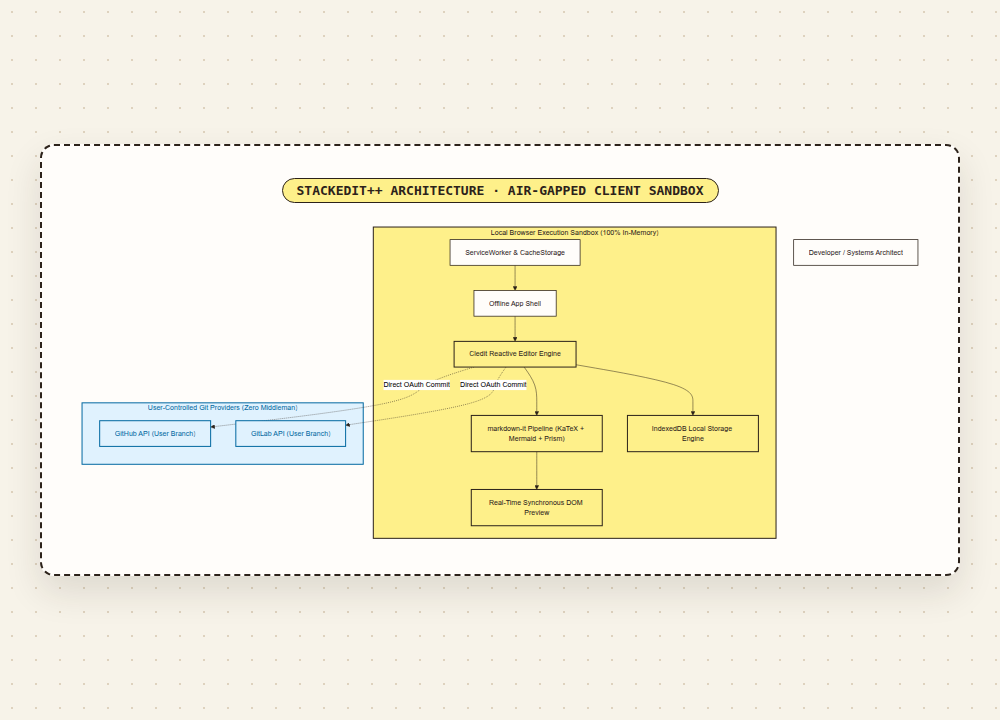
🏗️ 1. The Core Architecture: Zero-Telemetry by Design
The architectural thesis behind StackEdit++ is straightforward: your browser is a powerful, sandboxed virtual machine. The server should never see your notes.
How the Sandbox Operates:
100% In-Memory Parsing: Every keystroke is evaluated directly inside the browser process memory. No remote APIs are called to parse Markdown, format tables, or calculate word counts.
Zero Telemetry & Tracking: StackEdit++ contains zero user tracking scripts, zero session replay tools (no Hotjar, no FullStory), and zero telemetry pings.
Strict Content-Security-Policy (CSP): The application server enforces strict headers (
Content-Security-Policy,X-Frame-Options, andX-Content-Type-Options) preventing unauthorized script injection or iframe framing.Air-Gapped Operation: Once cached via its Progressive Web App (PWA) Service Worker, StackEdit++ works entirely offline—on cross-country flights, subway commutes, or in secure Faraday-cage enterprise rooms.
⚡ 2. Modern Vector Rendering: KaTeX Math & Mermaid Diagrams
Technical documentation requires more than simple bold and italic formatting. It demands complex mathematical formulas, architecture schematics, and accurate syntax highlighting.
A. Sub-Millisecond LaTeX Math (KaTeX)
Unlike legacy math renderers (like MathJax) that trigger heavy DOM reflows and take seconds to render large equations, StackEdit++ embeds KaTeX. Math expressions render synchronously in sub-millisecond execution loops:
Whether formatting Navier-Stokes equations, loss functions, or quantum computing tensors, equations render cleanly with zero layout shift.
B. Synchronous Vector Architecture Diagrams (Mermaid)
Architecture docs live and die by their diagrams. Instead of switching to an external vector drawing tool, exporting PNGs, and dealing with broken image links, you can declare live diagrams directly in Markdown code fences:
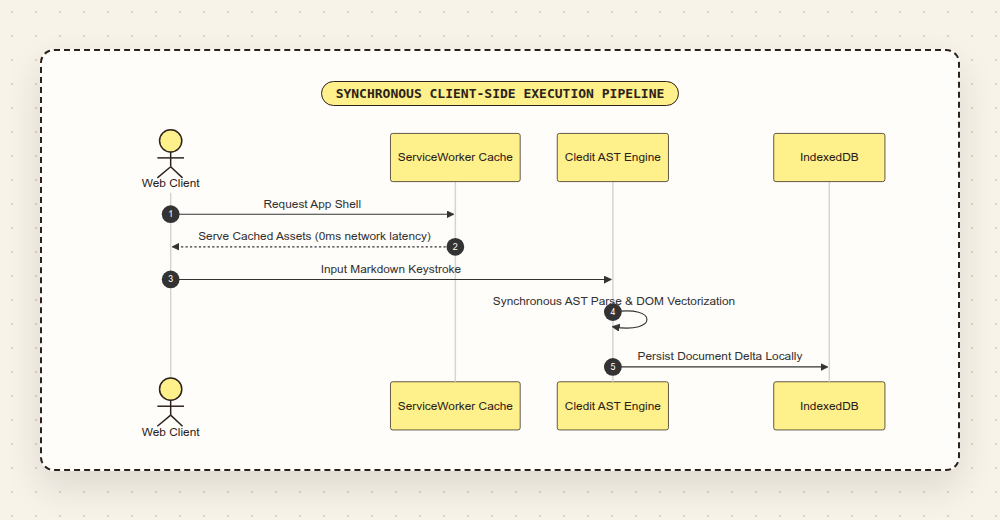
StackEdit++ compiles this into vector SVG in real time, with support for sequence diagrams, state charts, Git graphs, and Entity-Relationship (ER) schemas.
💾 3. Offline-First IndexedDB Persistence
Cloud applications frequently leave users vulnerable to network latency, server downtime, and sudden paywalls. StackEdit++ uses the browser's native IndexedDB database to ensure you never lose a single keystroke:
Continuous Local Auto-Save: Keystrokes are buffered and committed to IndexedDB asynchronously as you write.
Crash & Refresh Resilience: If your laptop runs out of battery or your browser tab crashes, opening the app restores your exact document state and cursor position.
Zero Vendor Lock-In: Your data is not trapped in proprietary JSON schemas. Documents can be exported with a single click to raw
.md, sanitized HTML, or styled PDF.
🐙 4. Direct-to-Git Sovereignty
When it is time to publish or collaborate, StackEdit++ does not force your team onto a proprietary cloud collaboration platform. Instead, it connects directly to your existing version control:
Direct GitHub & GitLab Commits: Authenticate once via OAuth directly against GitHub or GitLab. StackEdit++ pushes atomic commits directly to your branch (e.g.,
main,docs/rfc-12), using the repository's native Git history as the source of truth.No Middleman Server: The GitHub token stays inside your browser's local storage and talks directly to
api.github.com. Our backend server never handles your repositories or tokens.
🎨 5. The Playful Papercraft Aesthetic
Most developer tools are designed either as stark, clinical monochrome terminals or generic dark-mode SaaS dashboards.
StackEdit++ features the Playful Papercraft Notebook design system—a tactile stationery aesthetic inspired by physical notebook desk pads:
Warm Parchment Canvas (
#fffdfa/#24202c): High contrast with reduced glare, specifically calibrated for long technical writing sessions.Tactile Stitched Borders & Washi Tape Accents: Subtle dashed borders (
1.5px dashed #2c221a) and pastel argyle washi tape trims that bring physical desk delight into digital tooling.Strict WCAG AAA Contrast: Roasted espresso ink (
#2c221a) on light parchment ensures a 6.2:1 contrast ratio for all secondary text and 12:1 for primary text.Spring Micro-Interactions: Snappy modal entrances with physical cubic-bezier spring physics and accessible reduced-motion fallbacks (
@media (prefers-reduced-motion: reduce)).
🚀 How to Try It & Join the Community
StackEdit++ is free, requires zero account signup, and is ready to use immediately:
🌐 Launch the Live App: stackeditplusplus.meshworld.in/app
📖 Explore Use Cases & Guides: stackeditplusplus.meshworld.in
💬 Community Hub & Issue Tracker: github.com/cooldashing24/stackedit-community
StackEdit++ is a sovereign, enhanced fork of StackEdit, honoring full Apache-2.0 upstream attribution to Benoit Schweblin.
If you find a parsing glitch, want to suggest a new client-side Markdown extension, or have ideas for offline developer workflows, drop an issue on our Community Hub. Happy writing!


